
Hello everyone, I want to present to your attention my main save, where there is literally everything and everything, including a 100% plot and a lot of open weapons, skills, suits.
100% Savegame
The Main Save:
Everything is on this save (Runes, Upgrades, Boss Stem Cells).
Customization:
In this section, you are presented with a variety of costumes including the King’s costume and its white version + DLC (The Queen and the Sea, The Bad Seed, Rise of the Giant, Return to Castlevania,Fatal Falls)
Weapons:
Now let’s turn to this guide, where you are presented with all the available weapons (throwing, grenades, traps, shields, forces).
Help in Setting up a Save:
The path to the Dead Cells saves:
- C:\ProgramFiles(x86)\Steam\userdata\893957103\588650\remote
Download Link:
Lost Save File Fix
If you have the game on steam and you lost your save:
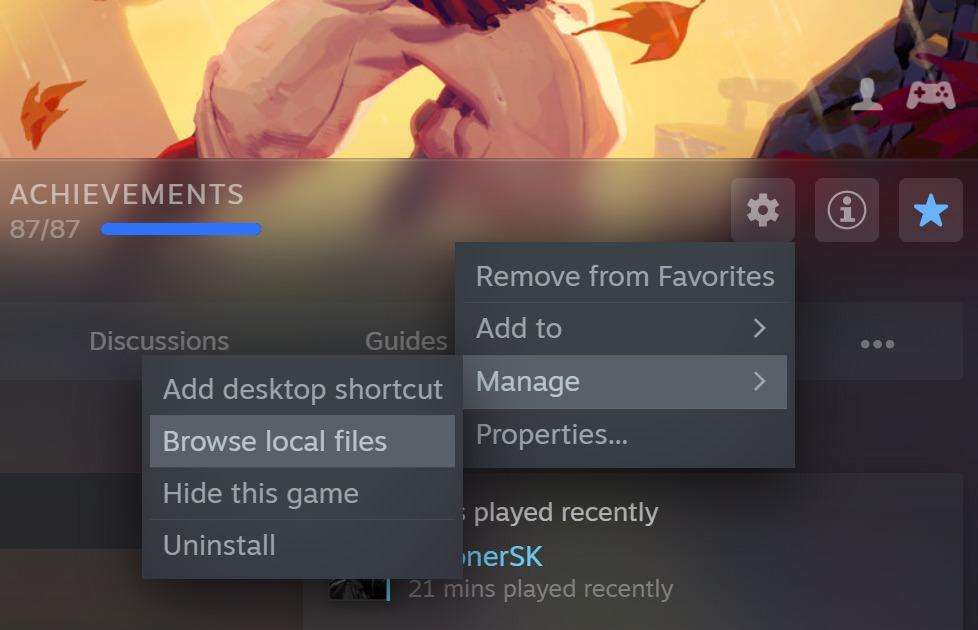
- Right click Dead Cells in your library.
- Go to > Manage > Browse local files.
- Once you’re in the game files, go to the “save” folder.
- Extract the latest backup zip file.
- Put the user. dat files into the save folder and replace the present ones.
- Restart your game and you should be good to go.
Note that if you’ve recently unlocked a weapon or permanent upgrade it may not have been backed up.